---
title: What are the quantities?
description: Everything you need to know about your project's quantities
---
[Skip to content](https://faq.visuary.com/en/en/what-are-the-quantities-#main-content)
- [English](https://faq.visuary.com/en/en/what-are-the-quantities-)
- [Français](https://faq.visuary.com/fr/en-quoi-consistent-les-metres)
English
Show submenu for translations
[.png?width=420&height=80&name=The%20smart%20floor%20plan%20(1).png)](https://visuary.com?hsLang=en)
Open main navigation
Close main navigation
- - [English](https://faq.visuary.com/en/en/what-are-the-quantities-)
- [Français](https://faq.visuary.com/fr/en-quoi-consistent-les-metres)
English
Show submenu for translations
- [Join our users community](https://www.facebook.com/groups/530256516376498/)
[Join our users community](https://www.facebook.com/groups/530256516376498/)
How can we help you?
- There are no suggestions because the search field is empty.
1. [Base de connaissances Visuary](https://faq.visuary.com/en/?hsLang=en)
2. [The concept of Visuary](https://faq.visuary.com/en//the-concept-of-visuary?hsLang=en)
September 16, 2026
# What are the quantities?
## Understand the concept and details of your quantities
Quantities refer to all the data collected on a building, space, or project in order to precisely quantify surfaces, lengths, volumes, and the quantities required to carry out the work.
Quantities allow you to:
- **Estimate the quantities of materials needed** (m² of tiles, m³ of concrete, linear meters of partitions, etc.)
- **Prepare an accurate quote** and properly price the work
- **Plan the project** by anticipating needs and constraints
Quantities are only available with an **ESSENTIAL** or **INTEGRAL** subscription.
On Visuary, your project’s quantities are accessible from the **“Quantities”** tab located at the top right of your screen. There you will find surface areas, volumes, lengths, perimeters, equipment, coverings, and more.
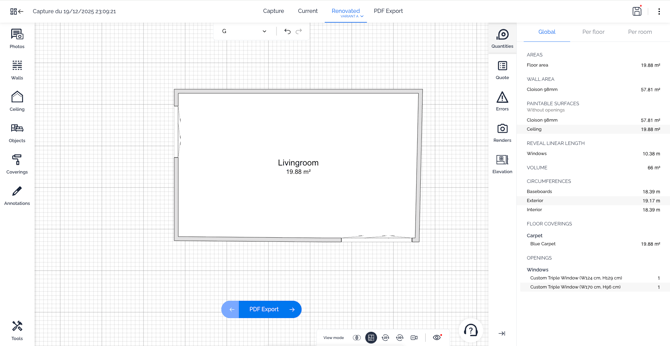
**The Quantities tab is automatically updated** based on the changes made to your plan.
### What information can you find in the Quantities tab?
Here are the elements available in the **Measurements** tab:
- **Partitions (in linear meters):** The total length of partitions, categorized by type (50 mm, 72 mm, etc.).
- **Wall surfaces (in m²):** Surface areas excluding openings, as well as surfaces including them.
- **Volumes (in m³):** To accurately quantify volumetric materials.
- **Perimeters (in meters):** Used to measure the perimeter of an element, i.e. the total length of its outline.
- **Products:** A list of equipment (such as doors and windows) present in your plan, room by room, with quantities and selected options/finishes.
- **Floor coverings:** Details of the coverings used, their quantities (in m²), and their location on the plan.
- **Wall coverings:** Quantities and locations of wall coverings (tiles, paint, etc.).
### How do you access the measurements in the interface?
To view the quantities for your current plan, go to the **Current Plan** tab.
To view those of your renovated plan, select the **Renovated Plan** tab. The quantities are automatically updated based on the changes made to your plan (current and/or renovated).
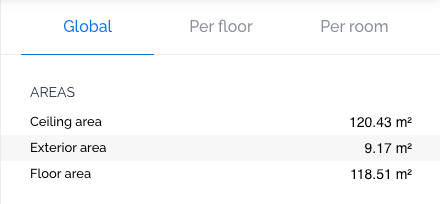
The **Quantities** tab is divided into three sub-tabs:
- Global measurements
- Measurements by floor
- Measurements by room
In each of these tabs, you will find the surface areas of the spaces as well as volumes, perimeters, and heights.
If you performed a capture and then modified your existing plan in the tool, the displayed surface areas will take these changes into account.
### What is the difference between “Wall and partition surfaces” and “Paintable surfaces”?
Wall and partition surfaces include openings, whereas paintable surfaces do not.
**If you want to obtain the surface area** of a single wall, you will need to apply a wall covering to that wall. Its surface area will then automatically appear in the **Quantities tab**.
### What is the difference between Quantities and the Quote?
**Quantities** correspond to all the quantities present in the plan you are viewing (current plan or renovated plan). It is the complete survey: surface areas, lengths, volumes, existing elements, and more.
The Quote, on the other hand, shows only the quantities related to the work carried out in the **Renovated Plan** tab. It is based on the difference between your current plan and your renovated plan. It includes only what needs to be added, removed, or modified, as well as the required services (demolition, creation, installation, leveling, etc.).
The Estimate is only available with the **INTEGRAL** subscription : [Learn more.](https://faq.visuary.com/en/en/quote-overview?hsLang=en)
- [The concept of Visuary](https://faq.visuary.com/en//the-concept-of-visuary?hsLang=en)
- [Frequently asked questions](https://faq.visuary.com/en//frequently-asked-questions?hsLang=en)
- [Capture a flat](https://faq.visuary.com/en//capture-a-flat?hsLang=en)
- [Draw, edit and renovate your floorplan](https://faq.visuary.com/en//draw-edit-and-renovate-your-floorplan?hsLang=en#main-content)
- [General questions](https://faq.visuary.com/en//draw-edit-and-renovate-your-floorplan?hsLang=en#general-questions)
- [Draw the current floorplan without capture](https://faq.visuary.com/en//draw-edit-and-renovate-your-floorplan?hsLang=en#draw-the-current-floorplan-without-capture)
- [Edit your floorplan](https://faq.visuary.com/en//draw-edit-and-renovate-your-floorplan?hsLang=en#edit-your-floorplan)
- [Add floors to your project](https://faq.visuary.com/en//draw-edit-and-renovate-your-floorplan?hsLang=en#add-floors-to-your-project)
- [Create variants of projects](https://faq.visuary.com/en//draw-edit-and-renovate-your-floorplan?hsLang=en#create-variants-of-projects)
- [Retrieve your project data](https://faq.visuary.com/en//retrieve-your-project-data?hsLang=en)
- [Customize your product catalog](https://faq.visuary.com/en//customize-your-product-catalog?hsLang=en)
- [Manage your autogenerated quote](https://faq.visuary.com/en//manage-your-autogenerated-quote?hsLang=en)
- [Communicate with your clients and partners](https://faq.visuary.com/en//communicate-with-your-clients-and-partners?hsLang=en)
- [Manage your account and subscription](https://faq.visuary.com/en//manage-your-account-and-subscription?hsLang=en)
##### visuary.com
[mailto:contact@visuary.fr](mailto:contact@visuary.fr)